Command Line Interface (CLI)
Overview
Run the Flyingduck scanner locally against a checked-out repo for ad-hoc validation (developer workstations, pre-commit checks, or manual investigations).
How it works
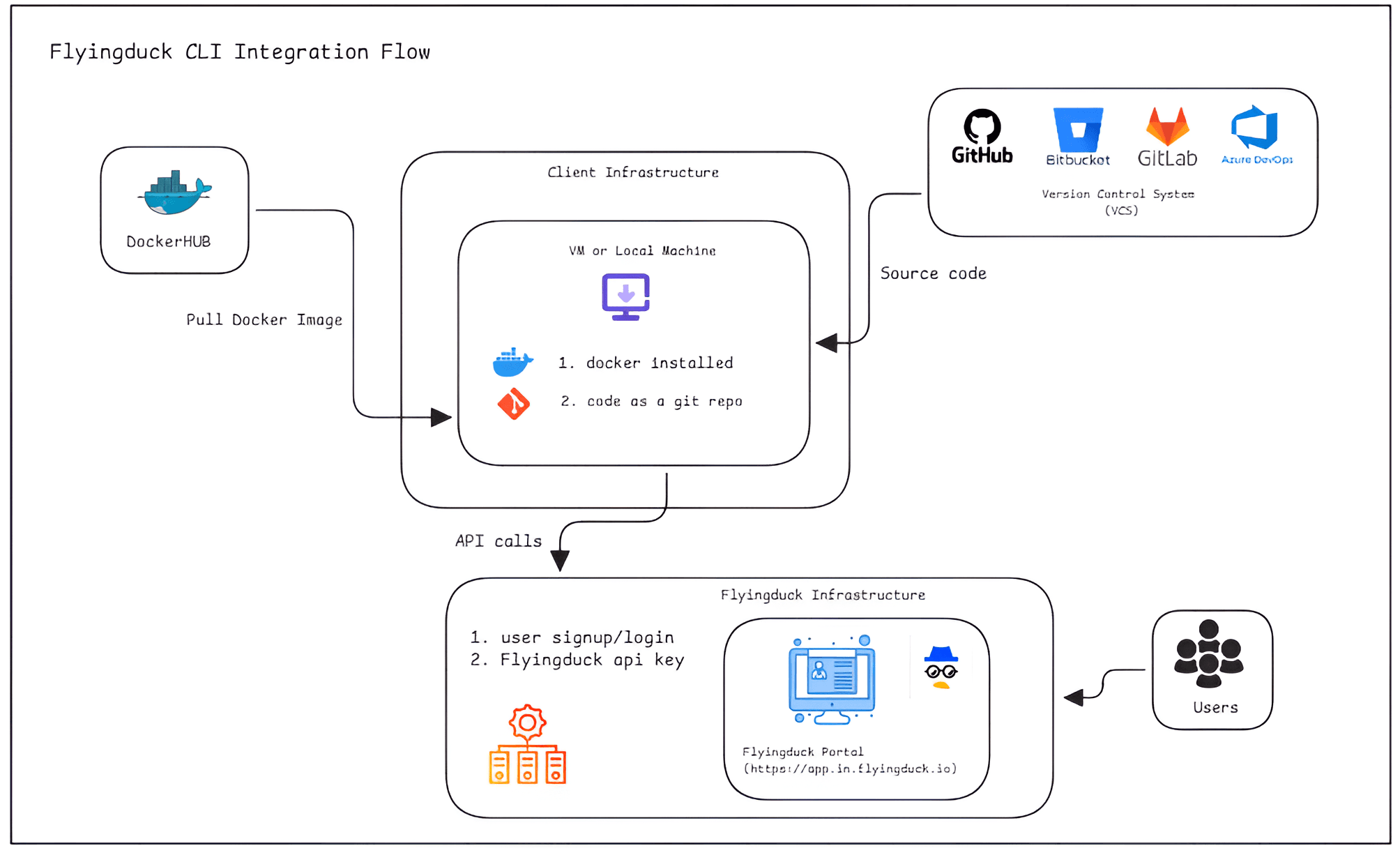
Flyingduck CLI Code Scanning Workflow
- The user must sign up or log in to the Flyingduck Portal and generate an API Key to run the CLI scan.
- The VM or Local Machine must have Docker installed and running.
- The user must clone their source code repository to the VM or Local Machine so that the repository code is available locally.
- The user checks out the repository and runs the Docker command from the VM or Local Machine to scan the code.
- After the scan completes, the scan results are automatically sent to the Flyingduck Portal.
- Users can view the code scanning results in the Flyingduck Portal dashboard.
Authentication with Flyingduck Platform
- The VM or Local Machine connects to the Flyingduck platform using the secure API key.
Network Whitelisting Requirements (Client Environment)
If the client environment has firewall or outbound restrictions on the VCS or Runner VM or Local Machine, the following domains must be whitelisted.
1. Docker Hub Access (Image Pull)
Allow the VM or Local Machine to access Docker Hub to pull the DuckDefender agent image.
https://registry-1.docker.io/*https://registry-1.docker.io/v2/*https://auth.docker.iohttps://production.cloudflare.docker.com
2. Flyingduck Platform Access
Allow the VM or Local Machine to communicate with the Flyingduck platform.
https://assets.in.flyingduck.iohttps://api-in.flyingduck.io
When to choose
Ad-hoc investigations, developer validation, pre-commit checks, or offline scanning.
About DuckDefender
DuckDefender is a Flyingduck agent that performs various security scans on your code repository. It helps identify hardcoded secrets, analyze libraries, and perform static application security testing (SAST). DuckDefender can perform scans for:
- SAST
- SBOM Analysis
- SCA
- Secrets Detection
Software Requirements
- Docker must be installed and running on the Linux VM (Min of 1 CPU, 4GB RAM, storage 10GB).
Install Docker (Official Documentation) (opens in a new tab) - Git must be installed on your machine (local machine, VM, server, or any environment).
Download Git (opens in a new tab)
Validate Docker Installation
Log in as ubuntu or any non-root user, and run:
docker run hello-worldIf Docker is installed and running correctly, you should see output similar to:
Hello from Docker!
This message shows that your installation appears to be working correctly.

To generate this message, Docker took the following steps:
 1. The Docker client contacted the Docker daemon.
 2. The Docker daemon pulled the "hello-world" image from the Docker Hub.
    (amd64)
 3. The Docker daemon created a new container from that image which runs the
    executable that produces the output you are currently reading.
 4. The Docker daemon streamed that output to the Docker client, which sent it
    to your terminal.
Environment Variables
DuckDefender requires the FD_API_KEY for authentication. You can configure it as follows:
Temporary (Session-Based) Environment Variable
export FD_API_KEY=valueDocker Command
DuckDefender can run different scans on SBOM, SCA, Secrets, and SAST.
Preparing the Repository
Choose the tab that matches how you have your code available:
Before running DuckDefender, clone your repository locally:
# Clone the source code
git clone https://github.com/example/repo.git

cd repo
Running the Scan
Run DuckDefender from the root of your repository. Choose how you want to provide your API key:
If you have already exported FD_API_KEY as an environment variable (see the Environment Variables section above), pass it through to the container:
docker run --pull=always -e FD_API_KEY="${FD_API_KEY}" -v "${PWD}:/src" --entrypoint /bin/bash flyingduckio/duckdefender:latest -c "duckdefender code --all"Usage
To explore all available options, run:
duckdefender -hYou will see output similar to:
Usage:
  duckdefender [flags]
  duckdefender [command]

Available Commands:
  code        Performs secrets, library, and SAST scans in VM
  help        Help about any command

Flags:
  -k, --apikey string      Provide API key
  -c, --connector string   Enable connectors
  -d, --daemon             Run in daemon mode
      --exit-on-error      Stop on secrets detection
  -h, --help               Help for duckdefender
  -l, --loglevel string    Set logging level (debug, info, warn, error) (default "info")
      --pre-commit string  Perform secrets scan before committing in IDE
  -u, --user string        Specify username
  -v, --validate           Validate secrets found in the repository

Use "duckdefender [command] --help" for more details about a specific command.
Commands
| Command | Description |
|---|---|
| help | Display usage and command information. |
| code | Inspect the codebase for secrets, library dependencies, and perform static security analysis on a VM. |
Flags
| Flag | Description |
|---|---|
-k, --apikey string | Set the FD_API_KEY for user authentication with Flyingduck. |
-c, --connector string | Enable connector threads in daemon mode. |
-d, --daemon | Run DuckDefender in daemon mode to execute queued tasks. |
--exit-on-error | Strict mode: detects and prints any secrets found. |
-h, --help | Display detailed usage information. |
-l, --loglevel string | Set logging level: debug, info, warn, error (default: info). |
--pre-commit string | Scan for secrets in IDE before committing code. |
-u, --user string | Specify the username. |
-v, --validate | Validate any secrets found in the repository. |
Metadata Collected
When performing scans, Flyingduck collects the following metadata to generate security reports:
- Repository information: Repository name, organization name, commit hash, commit message, commit timestamp, branch name, committer ID, name and email.
- VCS provider information: GitHub, Bitbucket, GitLab, or Azure DevOps provider ID, commit events, PR events.
- Pull request information: PR ID, source branch, destination branch, other PR-related metadata.
- Package versions and finding locations: List of packages and their versions used in the repository for dependency analysis, along with file names and line numbers where secrets and SAST findings are detected (note: actual content of secrets or vulnerable code is not transmitted).