Docker Image Security Integration (AWS ECR)
Flyingduck provides Docker image security scanning by integrating directly with cloud-based container registries. This integration enables teams to detect security vulnerabilities in container images before they are deployed into production.
Currently, Flyingduck supports Docker image scanning via AWS Elastic Container Registry (ECR).
Overview
With Docker integration enabled, Flyingduck securely connects to your AWS ECR registry and scans Docker images for security vulnerabilities at multiple levels.
A Docker image, in this context, is uniquely identified as:
Image = Repository + TagExample:
backend-service:1.0.3Recently pushed image is scanned independently based on its repository and tag combination.
What Flyingduck Scans
Flyingduck performs a comprehensive security analysis on Docker images, covering:
1. OS-Level Vulnerabilities
Vulnerabilities in the base operating system of the image
Examples:
- Ubuntu / Alpine OS issues
- System libraries
- OS-installed packages
2. Package-Level Vulnerabilities
Vulnerabilities in application dependencies bundled inside the image
Examples:
- npm / yarn packages
- pip libraries
- Language-specific dependencies
- Runtime libraries
This ensures complete visibility into both infrastructure-level and application-level risks.
Security Model
Flyingduck uses a secure, read-only, IAM role–based access model to integrate with AWS ECR.
- ✅ No AWS access keys are stored in Flyingduck
- ✅ No Docker images are copied or uploaded
- ✅ Access is limited strictly to what is required for image discovery and scanning
Prerequisites
Before starting the integration, ensure:
- You have an AWS account with ECR enabled
- Docker images exist in AWS ECR
- You have permissions to:
- Create IAM roles
- Launch CloudFormation stacks
Integration Flow
Step 1: Navigate to Docker Images
Go to the Docker Images section in Flyingduck. If no integrations exist, AWS ECR will appear as an available registry option.
Step 2: Initiate Integration
Click Integrate or Docker Integration to begin setup.
Step 3: Launch CloudFormation Stack
Click Launch Stack.
This will open an AWS CloudFormation template that:
- Creates a dedicated IAM role
- Grants read-only access to AWS ECR
- Outputs an IAM Role ARN
Step 4: Provide Role ARN
Copy the generated Role ARN and paste it into the Role ARN field in Flyingduck.
Step 5: Complete Integration
Click Connect to complete the integration.
Once successful:
- Flyingduck will discover Docker images from ECR
- Images will appear in the Docker page, click on Docker to check the results
- Scanning begins automatically
Viewing Scan Results
After successful integration, the results will be displayed as shown below:
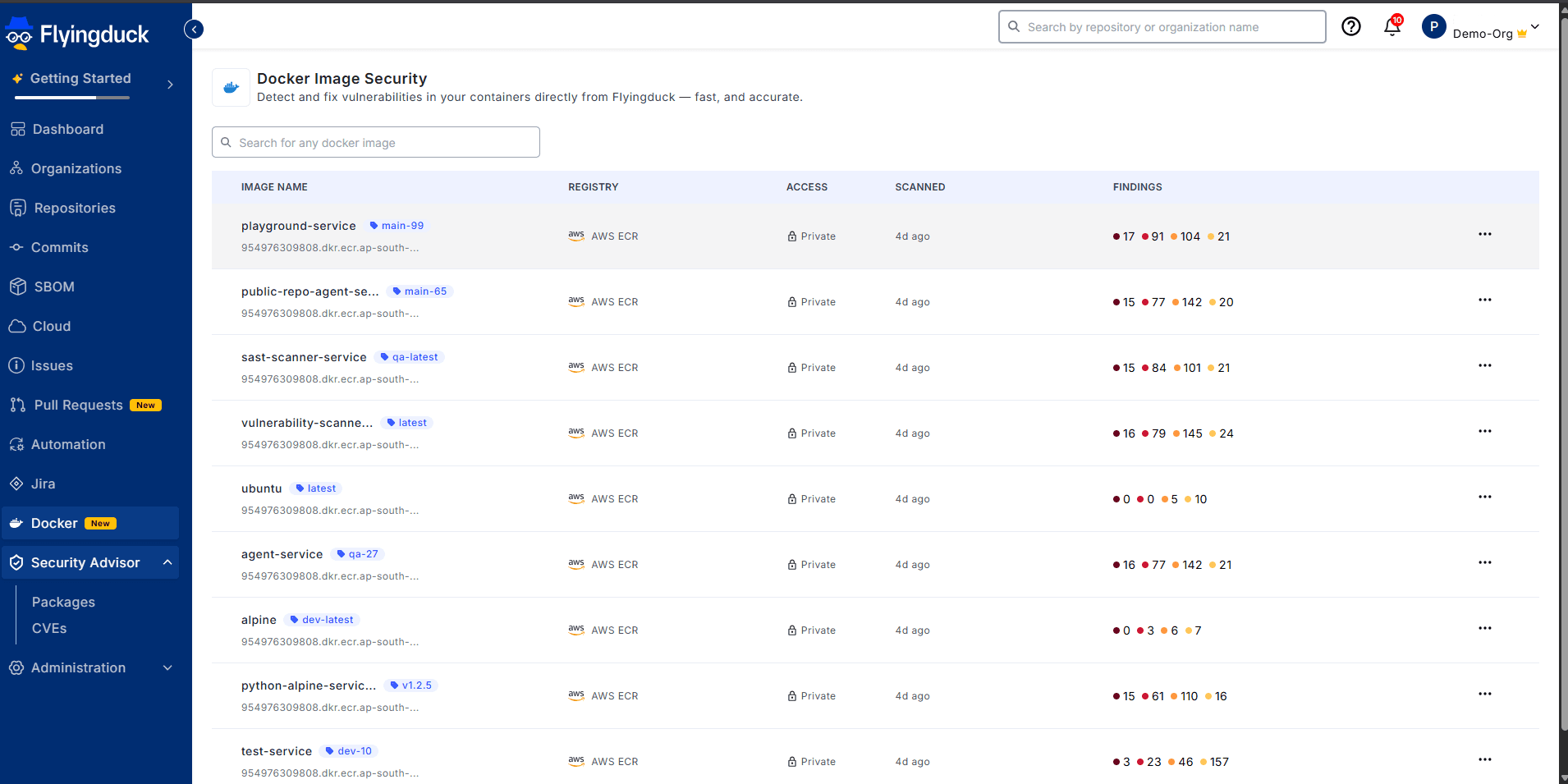
Docker images are listed with:
- Repository
- Tag
- Registry (AWS ECR)
- Scan status
- Security findings
Recently pushed images are scanned independently, and findings are categorized by severity.
Scope & Limitations
- This integration is currently applicable only for cloud-based registries
- Local Docker images are not supported
- Permissions configuration is handled entirely via AWS IAM
- Each image scan is based on a specific repository + tag
Key Takeaways
- Docker image = Repository + Tag
- Scans cover both OS and package-level vulnerabilities
- Secure IAM-based access (no credentials stored)
- Zero image uploads — scanning happens via controlled access
- Designed for production-grade cloud environments